Pressure builds fast inside a small shop. One late shipment or a mislabeled batch, and a customer who once trusted you starts asking hard questions.
Picture a 40-person machine shop trying to pull together records during a customer audit. Everyone’s digging through binders, flipping through old spreadsheets, asking, “Who filled this out?” Meanwhile, the auditor is waiting, and a major contract is on the line. A bigger manufacturer would pull up the info in seconds.
According to the Manufacturing Leadership Council1, 70% of manufacturers still enter data manually.
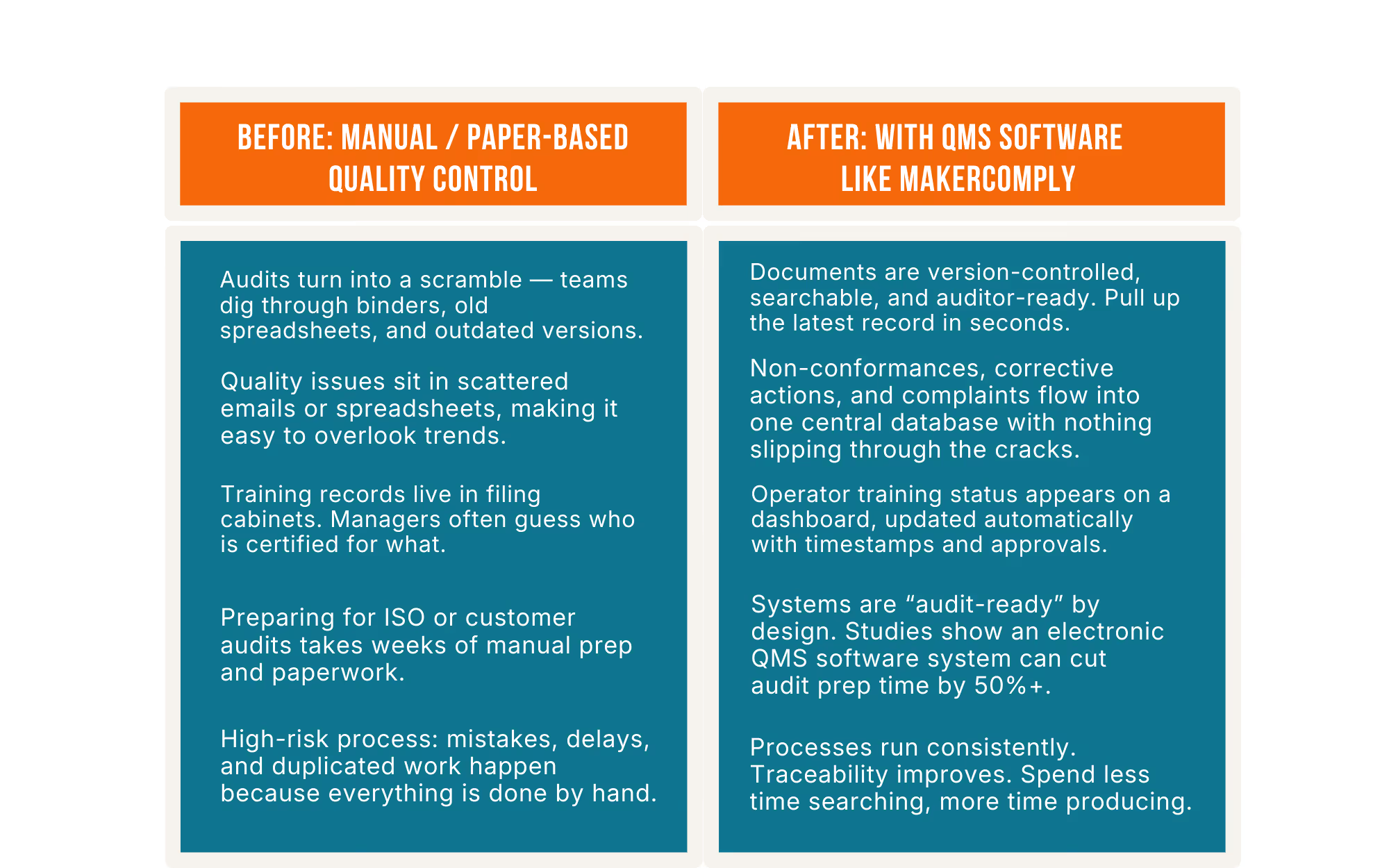
A modern QMS shifts you from scramble mode to continuous audit-readiness.
…and that alone can impress a customer more than anything else.
Read on to see how small U.S. manufacturers can use QMS to cut scrap, calm audits, and win more OEM work. You’ll get a simple breakdown of ROI, key features, the 4C framework, and a rollout plan that actually fits a 20-person shop.
Investing in software might seem hard to justify for a small operation, so let’s talk return on investment (ROI) in tangible terms.
Small improvements add up fast. Take a 25-person job shop with $2 million in annual sales. If better process control reduces scrap by just 2%, that’s roughly $40,000 saved each year in wasted material and labor.
This aligns with industry data showing the Cost of Poor Quality (COPQ) often sits around 20% of revenue for typical manufacturers2. Even a single percentage point of improvement pays off.
Manual data entry, double-checking documents, and hunting for records are hidden costs. Companies lose tens of thousands of dollars every year fixing manual-entry errors.
A QMS cuts this down by automating reports, training updates, approvals, and data capture. Teams gain hours back every week, which often means you can grow without hiring extra people.
The financial return is fast:
These aren’t enterprise-only results. Small manufacturers often see the biggest jump because they’re eliminating manual steps right away.
You feel the difference day to day:

Myth: “A QMS is too expensive and too complex for a 20-person shop. And we don't have the technical expertise to get it running.”
Reality: A cloud-based QMS gives small manufacturers the same capabilities large plants rely on without servers or dedicated IT. If it's purpose-built for small-to-medium manufacturers, like MakerComply, you'll see a rapid return on investment.
Research shows:
Cost isn’t the barrier anymore — sticking with paper usually costs more in the long run.
There are lots of features and vendors touting various bells and whistles. To cut through the noise, we introduce the “4C” framework – four key criteria to consider: Cost, Compliance, Culture Fit, and Connectivity.
What’s the total cost of ownership (software, training, downtime)?
Don’t just look at the sticker price of the software subscription; consider the total cost over, say, 5 years. This includes implementation services, any needed hardware, training time for your team, and ongoing support. Be mindful of hidden costs: for example, will you need to hire a consultant to set it up, or can your team handle it? Will the vendor charge for each additional module or user?
Remember that many QMS solutions are cloud-based subscriptions now, meaning you typically pay an annual or monthly fee that covers licensing, support, and updates (no hefty one-time license plus separate maintenance fees as was common in the past). For example, MakerComply's pricing is simple and transparent, based on just the tools you need.
How does the QMS map to the standards or customer requirements you face (ISO 9001, FDA regulations, automotive/aerospace specs, etc.?
A good QMS should align with relevant standards out-of-the-box. For example, if you aim for ISO 9001 certification, the QMS should help you meet ISO’s documentation and record-keeping requirements. It should offer guided workflows for things like document control, internal audit checklists, or CAPA (Corrective and Preventive Action) processes that mirror ISO clauses.
Even if you are not yet certified, choosing a QMS that supports these compliance frameworks is wise. It future-proofs your business (e.g. if a new customer asks if you have a quality system aligned to ISO 9001, you can confidently say yes).
Will your team actually use it? Is it over-engineered for your needs?
The greatest (and most expensive) QMS in the world is useless if your employees find it clunky or intimidating and avoid using it. Culture fit might be the most overlooked factor. For a small manufacturer, “culture fit” means the software matches the skill level and work style of your people, and the scope of the system matches the scale of your operation. Beware of over-engineering: a system designed for a 5,000-employee corporation might be total overkill for a 20-person shop. There will be dozens of modules and hyper-granular controls that you don’t need.
Another aspect of culture fit is training and support. Does the vendor provide accessible training materials (videos, help articles) that suit people who may not be tech experts?
Here we’ll separate the “must-have” features from the “nice-to-have” so you can focus your attention (and budget) on what will deliver value from day one.
It’s worth noting that a good QMS supports Lean manufacturing principles rather than conflicting with them. Lean is all about eliminating waste and continuous improvement.
A QMS provides the structured framework to do that systematically. For example, the CAPA process is essentially the PDCA (Plan-Do-Check-Act) cycle embodied in software; you plan a corrective action, execute it, check the results, and institutionalize the improvement.
Likewise, QMS can assist with 5S audits (via audit checklists) and ensure standard work documents are up to date (a key for Lean stability).
Here’s a practical playbook for rolling out a QMS in a small operation, broken into manageable phases. The mantra here is “Start small, win early, then scale up”.
Compliance gets a bad reputation as paperwork and pressure, but for small manufacturers it can be a strategic advantage.
A digital QMS makes it easy to prove you’re a high-quality, low-risk supplier. Instead of scrambling before an ISO audit or customer visit, you stay audit-ready because the system tracks changes, timestamps approvals, and keeps everything in order. When customers ask for evidence, you can deliver it instantly. That responsiveness is part of your value, not just a compliance checkbox.
This also ties directly into the current U.S. manufacturing environment. Reshoring, Made-in-America requirements, DFARS, and government supplier rules all emphasize traceability and digital documentation.
Many primes now expect electronic submission of quality data or portal-based reporting. Without a digital QMS, a small shop can’t meet those expectations and gets filtered out before quoting.
Q1. What’s the real ROI of QMS software for a 20-person manufacturer?
A QMS cuts scrap, rework, and administrative time, while making audits smoother and preventing costly mistakes. Many small companies recoup the investment within the first year as quality-related losses shrink. Even a small drop in scrap or rework can translate into tens of thousands saved annually.
Q2. How can a small shop afford quality software without an IT team?
MakerComply, like most modern QMS platforms are cloud-based, so there’s no server setup or technical maintenance. You log in through a browser, and the vendor handles updates, backups, and support.
Q3. Which modules should I start with first?
Start with the essentials: Document Control, Training Records, Incident Management/CAPA, and Audit Management. These modules fix the biggest pain points fast and form the backbone of ISO-aligned quality management. Once these run smoothly, you can add supplier or inspection modules.
Q4. Can I implement a QMS if I’m not yet ISO-certified?
Yes, a QMS helps you run better processes now, and if you choose to pursue ISO 9001 later, most of the work is already done. Many small manufacturers use a QMS without ever certifying and still gain the operational benefits.
Q5. How long before you see measurable quality improvements?
You’ll usually notice quick wins in the first few weeks (more up-to-date training, faster document access, fewer errors, and smoother audits). By 3–6 months, defect rates, CAPA closure times, and training compliance typically improve as the system drives consistency.
Q6. What are the hidden costs (training, audits, upgrades)?
You may need a few tablets or minor Wi-Fi upgrades for shop-floor access. Beyond that, most cloud QMS fees include updates and support, so ongoing costs stay predictable. Look for a system where you can see that you'll minimize your time investment for setup and early learning curves.
Q7. How do I get operator buy-in on the shop floor?
Involve operators early, explain the “why,” and keep the interface simple. Show them how the QMS makes their jobs easier.
Q8. Is cloud QMS data secure enough for regulated industries?
Yes. Reputable QMS vendors use encryption, role-based access, audit trails, and compliance-ready controls that often exceed what small firms can manage in-house.
Q9. What KPIs should I track in the first 6 months?
Monitor non-conformance rates, CAPA closure times, training completion, first-pass yield, and audit findings.
2. https://www.qualio.com/blog/benefits-of-a-quality-management-system
3. https://www.trackmedium.com/blog/a-step-by-step-guide-to-successfully-implementing-qms-software/
4. https://www.effivity.com/blog/why-a-digital-qms-is-no-longer-optional-in-2025
5. https://www.fortunebusinessinsights.com/industry-reports/quality-management-software-market-100761
Pressure builds fast inside a small shop. One late shipment or a mislabeled batch, and a customer who once trusted you starts asking hard questions.
Picture a 40-person machine shop trying to pull together records during a customer audit. Everyone’s digging through binders, flipping through old spreadsheets, asking, “Who filled this out?” Meanwhile, the auditor is waiting, and a major contract is on the line. A bigger manufacturer would pull up the info in seconds.
According to the Manufacturing Leadership Council1, 70% of manufacturers still enter data manually.
A modern QMS shifts you from scramble mode to continuous audit-readiness.
…and that alone can impress a customer more than anything else.
Read on to see how small U.S. manufacturers can use QMS to cut scrap, calm audits, and win more OEM work. You’ll get a simple breakdown of ROI, key features, the 4C framework, and a rollout plan that actually fits a 20-person shop.
Investing in software might seem hard to justify for a small operation, so let’s talk return on investment (ROI) in tangible terms.
Small improvements add up fast. Take a 25-person job shop with $2 million in annual sales. If better process control reduces scrap by just 2%, that’s roughly $40,000 saved each year in wasted material and labor.
This aligns with industry data showing the Cost of Poor Quality (COPQ) often sits around 20% of revenue for typical manufacturers2. Even a single percentage point of improvement pays off.
Manual data entry, double-checking documents, and hunting for records are hidden costs. Companies lose tens of thousands of dollars every year fixing manual-entry errors.
A QMS cuts this down by automating reports, training updates, approvals, and data capture. Teams gain hours back every week, which often means you can grow without hiring extra people.
The financial return is fast:
These aren’t enterprise-only results. Small manufacturers often see the biggest jump because they’re eliminating manual steps right away.
You feel the difference day to day:
Myth: “A QMS is too expensive and too complex for a 20-person shop. And we don't have the technical expertise to get it running.”
Reality: A cloud-based QMS gives small manufacturers the same capabilities large plants rely on without servers or dedicated IT. If it's purpose-built for small-to-medium manufacturers, like MakerComply, you'll see a rapid return on investment.
Research shows:
Cost isn’t the barrier anymore — sticking with paper usually costs more in the long run.
There are lots of features and vendors touting various bells and whistles. To cut through the noise, we introduce the “4C” framework – four key criteria to consider: Cost, Compliance, Culture Fit, and Connectivity.
What’s the total cost of ownership (software, training, downtime)?
Don’t just look at the sticker price of the software subscription; consider the total cost over, say, 5 years. This includes implementation services, any needed hardware, training time for your team, and ongoing support. Be mindful of hidden costs: for example, will you need to hire a consultant to set it up, or can your team handle it? Will the vendor charge for each additional module or user?
Remember that many QMS solutions are cloud-based subscriptions now, meaning you typically pay an annual or monthly fee that covers licensing, support, and updates (no hefty one-time license plus separate maintenance fees as was common in the past). For example, MakerComply's pricing is simple and transparent, based on just the tools you need.
How does the QMS map to the standards or customer requirements you face (ISO 9001, FDA regulations, automotive/aerospace specs, etc.?
A good QMS should align with relevant standards out-of-the-box. For example, if you aim for ISO 9001 certification, the QMS should help you meet ISO’s documentation and record-keeping requirements. It should offer guided workflows for things like document control, internal audit checklists, or CAPA (Corrective and Preventive Action) processes that mirror ISO clauses.
Even if you are not yet certified, choosing a QMS that supports these compliance frameworks is wise. It future-proofs your business (e.g. if a new customer asks if you have a quality system aligned to ISO 9001, you can confidently say yes).
Will your team actually use it? Is it over-engineered for your needs?
The greatest (and most expensive) QMS in the world is useless if your employees find it clunky or intimidating and avoid using it. Culture fit might be the most overlooked factor. For a small manufacturer, “culture fit” means the software matches the skill level and work style of your people, and the scope of the system matches the scale of your operation. Beware of over-engineering: a system designed for a 5,000-employee corporation might be total overkill for a 20-person shop. There will be dozens of modules and hyper-granular controls that you don’t need.
Another aspect of culture fit is training and support. Does the vendor provide accessible training materials (videos, help articles) that suit people who may not be tech experts?
Here we’ll separate the “must-have” features from the “nice-to-have” so you can focus your attention (and budget) on what will deliver value from day one.
It’s worth noting that a good QMS supports Lean manufacturing principles rather than conflicting with them. Lean is all about eliminating waste and continuous improvement.
A QMS provides the structured framework to do that systematically. For example, the CAPA process is essentially the PDCA (Plan-Do-Check-Act) cycle embodied in software; you plan a corrective action, execute it, check the results, and institutionalize the improvement.
Likewise, QMS can assist with 5S audits (via audit checklists) and ensure standard work documents are up to date (a key for Lean stability).
Here’s a practical playbook for rolling out a QMS in a small operation, broken into manageable phases. The mantra here is “Start small, win early, then scale up”.
Compliance gets a bad reputation as paperwork and pressure, but for small manufacturers it can be a strategic advantage.
A digital QMS makes it easy to prove you’re a high-quality, low-risk supplier. Instead of scrambling before an ISO audit or customer visit, you stay audit-ready because the system tracks changes, timestamps approvals, and keeps everything in order. When customers ask for evidence, you can deliver it instantly. That responsiveness is part of your value, not just a compliance checkbox.
This also ties directly into the current U.S. manufacturing environment. Reshoring, Made-in-America requirements, DFARS, and government supplier rules all emphasize traceability and digital documentation.
Many primes now expect electronic submission of quality data or portal-based reporting. Without a digital QMS, a small shop can’t meet those expectations and gets filtered out before quoting.
Q1. What’s the real ROI of QMS software for a 20-person manufacturer?
A QMS cuts scrap, rework, and administrative time, while making audits smoother and preventing costly mistakes. Many small companies recoup the investment within the first year as quality-related losses shrink. Even a small drop in scrap or rework can translate into tens of thousands saved annually.
Q2. How can a small shop afford quality software without an IT team?
MakerComply, like most modern QMS platforms are cloud-based, so there’s no server setup or technical maintenance. You log in through a browser, and the vendor handles updates, backups, and support.
Q3. Which modules should I start with first?
Start with the essentials: Document Control, Training Records, Incident Management/CAPA, and Audit Management. These modules fix the biggest pain points fast and form the backbone of ISO-aligned quality management. Once these run smoothly, you can add supplier or inspection modules.
Q4. Can I implement a QMS if I’m not yet ISO-certified?
Yes, a QMS helps you run better processes now, and if you choose to pursue ISO 9001 later, most of the work is already done. Many small manufacturers use a QMS without ever certifying and still gain the operational benefits.
Q5. How long before you see measurable quality improvements?
You’ll usually notice quick wins in the first few weeks (more up-to-date training, faster document access, fewer errors, and smoother audits). By 3–6 months, defect rates, CAPA closure times, and training compliance typically improve as the system drives consistency.
Q6. What are the hidden costs (training, audits, upgrades)?
You may need a few tablets or minor Wi-Fi upgrades for shop-floor access. Beyond that, most cloud QMS fees include updates and support, so ongoing costs stay predictable. Look for a system where you can see that you'll minimize your time investment for setup and early learning curves.
Q7. How do I get operator buy-in on the shop floor?
Involve operators early, explain the “why,” and keep the interface simple. Show them how the QMS makes their jobs easier.
Q8. Is cloud QMS data secure enough for regulated industries?
Yes. Reputable QMS vendors use encryption, role-based access, audit trails, and compliance-ready controls that often exceed what small firms can manage in-house.
Q9. What KPIs should I track in the first 6 months?
Monitor non-conformance rates, CAPA closure times, training completion, first-pass yield, and audit findings.
2. https://www.qualio.com/blog/benefits-of-a-quality-management-system
3. https://www.trackmedium.com/blog/a-step-by-step-guide-to-successfully-implementing-qms-software/
4. https://www.effivity.com/blog/why-a-digital-qms-is-no-longer-optional-in-2025
5. https://www.fortunebusinessinsights.com/industry-reports/quality-management-software-market-100761