Take a moment to imagine the following scenarios in your small manufacturing plant, knowing that any or all of them could happen in any given week:
For any small manufacturing business, these kinds of incidents might seem easy to ignore, or to chalk up as unavoidable accidents. Following up on them can be time-consuming and might not seem worth the trouble. But treating them lightly can also come back to haunt you – in the form of increased costs, delayed shipments, OSHA citations, machine downtime and reduced profits.
Proper incident reporting isn’t a nice-to-have for your business. It’s a critical part of any professional operation. Keeping track of seemingly small incidents in a modest manufacturing business will pay dividends because it allows you to identify and correct bad habits, blind spots and potential expensive pitfalls. While it may seem penny-wise and pound-foolish to spend time logging seemingly small incidents in your business, it actually makes perfect sense. Your plant is operating on much smaller margins than big corporations, and you can’t afford to make the mistakes they do.
Incident reporting is even more important when you consider how many different jobs managers are juggling these days. There’s very little time to deal with the big problems in your plant, let alone the little ones. Automating as much of it as possible is in your best interests.
Fortunately, modern incident reporting software automates a lot of the process that was once done on paper forms, making it easier for managers across the organization to immediately identify bad trends and potential problems before they get out of control. Simple, affordable tools can now keep everyone in the loop without burying managers in paperwork. And the return on investment (ROI) on the software can add up to quite a lot over time.
On the plus side, look at the cost of downtime. For instance, studies show that ~60–80% of major equipment failures resulting in downtime are preceded by warning signs, minor stoppages, or near misses. And for mid-sized factories, that downtime costs you up to $10,000 per hour. The World Economic Forum has shown that better incident reporting has been linked to substantial decreases in high-risk incidents and associated unplanned downtime. If you save yourself a single hour of downtime with improved incident reporting, you’ll see immediate ROI with the right software in place.
One of the hidden benefits of a good incident reporting tool, if it includes corrective action management like MakerComply does, is that you will lower your risk of ISO, FDA, and OSHA citations. That’s because all of these bodies look at incidents as an opportunity to learn from – and you can prove that you’re doing that if you can demonstrate your Corrective Action/Prevention Action (CAPA) response to each incident.
Consider the costs of setting up incident reporting software - look for tools like MakerComply where you can set the software up in an afternoon. Avoid tools that have hidden implementation fees that can be more than the cost of the license or subscription fee for the reporting software itself. The setup costs should be nominal compared to the long-term benefits.
You can do a back-of-the-envelope calculation by looking at recent incidents in your own shop: if a delay in repairing a critical piece of equipment, or in spotting a defect in your product could have been prevented, how much money would you have saved? How much frustration would have been prevented on the floor, and how much higher would productivity be? By flagging incidents and building a framework to prevent them in the future, you’ll see the overall number of incidents decline. That leads to less downtime, lower insurance and reduced risk premiums, better quality, higher productivity and avoidance of regulatory fines.
You’ll also discover the knock-on effects of reduced incidents: increased morale and retention among employees, boosted audit readiness, and higher-quality data available for managers.
Not all incident reporting software is the same. Well-designed incident reporting software should make the reporting and tracking of incidents both easy and intuitive.
First, it should be simple to set up. It should be intuitive enough that anyone on the floor can (and will) use it, whether they’re using a desktop, laptop or mobile device. The software should offer a mobile data capture reporting form that’s so simple, a problem can be reported in under two minutes. If incident reporting software is cumbersome or difficult to use, your workers on the floor won’t bother with it, and you won’t get an accurate accounting of what’s going on.
The software you choose should also have robust tools to track incident patterns, including dashboards and trend detection that allows you to shift from reactive to proactive actions. And it should have robust analytics tools that communicate clearly where your problems are and how you are doing in addressing them. It should also have regulatory tools that make it a simple matter to integrate your OSHA logs and other reports into a single place.
You should also make sure the vendor you choose has a track record of building software for small clients, not just mammoth corporations. A good vendor will be willing to work with you after the sale, even if you’re not the biggest fish in the pond, and will provide the support you need if you run into trouble.
Other things you want to consider: the tool should be scalable so that it can grow as your company grows. And it should support your culture –workers won’t report failures or near-miss incidents if they fear they’ll be blamed for things going wrong.
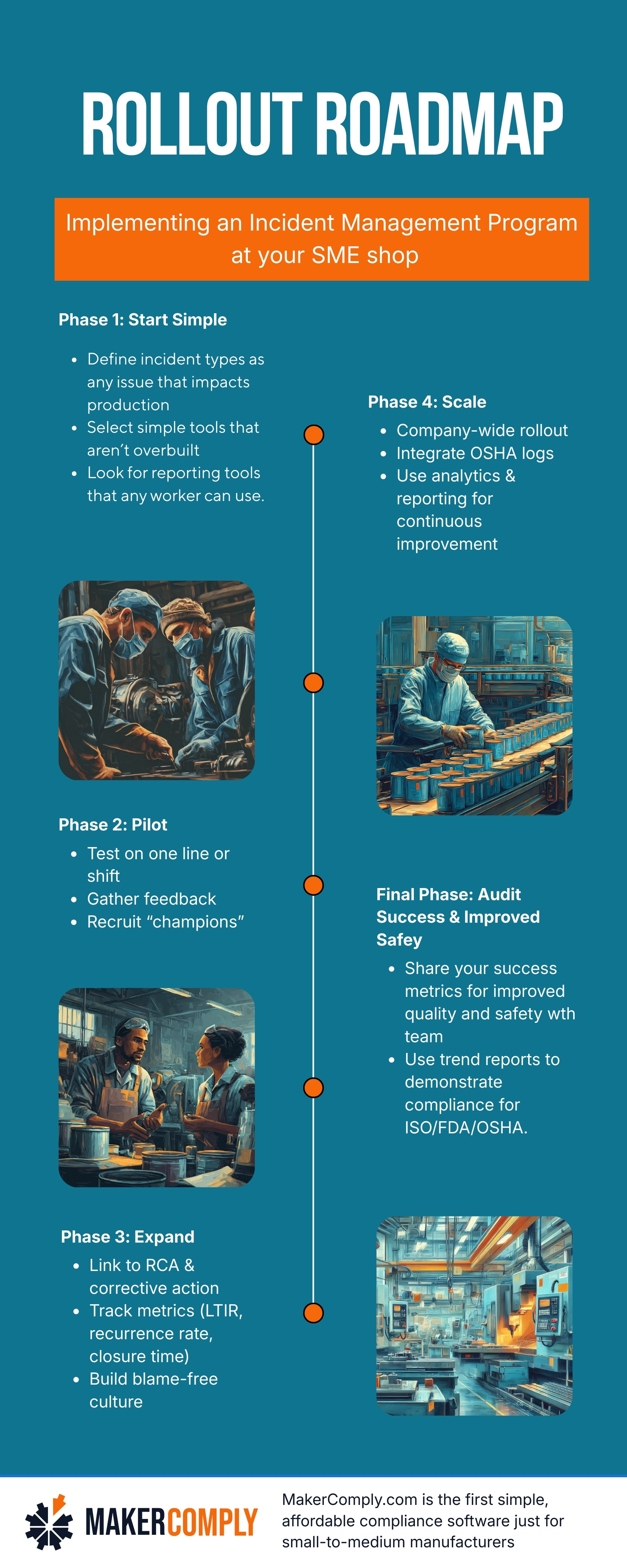
There’s more to rolling out incident reporting software in a company than buying the tool and then telling everyone to start using it. Here are some do’s and don’ts that will help make your rollout process smooth and successful
Q: What is incident reporting software, and how is it different from safety inspections or audits?
A: Incident reporting software is designed to help you identify and correct recurring problems and negative trends in your manufacturing processes, including safety protocols. It doesn’t take the place of safety inspections or audits, but it can help you navigate those things more easily.
Q: Do I really need incident reporting software if I use paper forms or spreadsheets now?
A: Incident reporting software like MakerComply represents a big step beyond paper forms and spreadsheets. It is easier to use, provides instant analytics, and keeps everyone in the company on the same page.
Q: What kind of incidents should I report?
A: Any kind of incident that threatens to cost money or reduce efficiency should be reported: Injuries, near misses, equipment damage, quality events, etc.
Q: How do I ensure employees actually use the software, especially floor staff?
A: You need to bring them in early and ensure that the forms are simple and intuitive. Consider recruiting “champions” for each line and each shift, who can answer simple questions from other workers on how to log incidents quickly and effectively.
Q: What are the key metrics I should track once the software is in place?
A: Some of the key metrics you want to capture include total incident count, near-miss count, lost time incident rate (LTIR), DARTs, TRIRs, days to closure of corrective actions, recurrence rate of similar incidents, cost per incident, and top root cause categories. However, you should never lose sight of your main goal amidst all the KPI data: your goal should always be to use incidents and problems as opportunities to improve your factory’s safety and quality.
Q: Can incident reporting software help me meet OSHA or other regulatory compliance?
A: Yes. Identifying potential safety issues early will help you correct them before OSHA decides it’s a problem they need to address.
Take a moment to imagine the following scenarios in your small manufacturing plant, knowing that any or all of them could happen in any given week:
For any small manufacturing business, these kinds of incidents might seem easy to ignore, or to chalk up as unavoidable accidents. Following up on them can be time-consuming and might not seem worth the trouble. But treating them lightly can also come back to haunt you – in the form of increased costs, delayed shipments, OSHA citations, machine downtime and reduced profits.
Proper incident reporting isn’t a nice-to-have for your business. It’s a critical part of any professional operation. Keeping track of seemingly small incidents in a modest manufacturing business will pay dividends because it allows you to identify and correct bad habits, blind spots and potential expensive pitfalls. While it may seem penny-wise and pound-foolish to spend time logging seemingly small incidents in your business, it actually makes perfect sense. Your plant is operating on much smaller margins than big corporations, and you can’t afford to make the mistakes they do.
Incident reporting is even more important when you consider how many different jobs managers are juggling these days. There’s very little time to deal with the big problems in your plant, let alone the little ones. Automating as much of it as possible is in your best interests.
Fortunately, modern incident reporting software automates a lot of the process that was once done on paper forms, making it easier for managers across the organization to immediately identify bad trends and potential problems before they get out of control. Simple, affordable tools can now keep everyone in the loop without burying managers in paperwork. And the return on investment (ROI) on the software can add up to quite a lot over time.
On the plus side, look at the cost of downtime. For instance, studies show that ~60–80% of major equipment failures resulting in downtime are preceded by warning signs, minor stoppages, or near misses. And for mid-sized factories, that downtime costs you up to $10,000 per hour. The World Economic Forum has shown that better incident reporting has been linked to substantial decreases in high-risk incidents and associated unplanned downtime. If you save yourself a single hour of downtime with improved incident reporting, you’ll see immediate ROI with the right software in place.
One of the hidden benefits of a good incident reporting tool, if it includes corrective action management like MakerComply does, is that you will lower your risk of ISO, FDA, and OSHA citations. That’s because all of these bodies look at incidents as an opportunity to learn from – and you can prove that you’re doing that if you can demonstrate your Corrective Action/Prevention Action (CAPA) response to each incident.
Consider the costs of setting up incident reporting software - look for tools like MakerComply where you can set the software up in an afternoon. Avoid tools that have hidden implementation fees that can be more than the cost of the license or subscription fee for the reporting software itself. The setup costs should be nominal compared to the long-term benefits.
You can do a back-of-the-envelope calculation by looking at recent incidents in your own shop: if a delay in repairing a critical piece of equipment, or in spotting a defect in your product could have been prevented, how much money would you have saved? How much frustration would have been prevented on the floor, and how much higher would productivity be? By flagging incidents and building a framework to prevent them in the future, you’ll see the overall number of incidents decline. That leads to less downtime, lower insurance and reduced risk premiums, better quality, higher productivity and avoidance of regulatory fines.
You’ll also discover the knock-on effects of reduced incidents: increased morale and retention among employees, boosted audit readiness, and higher-quality data available for managers.
Not all incident reporting software is the same. Well-designed incident reporting software should make the reporting and tracking of incidents both easy and intuitive.
First, it should be simple to set up. It should be intuitive enough that anyone on the floor can (and will) use it, whether they’re using a desktop, laptop or mobile device. The software should offer a mobile data capture reporting form that’s so simple, a problem can be reported in under two minutes. If incident reporting software is cumbersome or difficult to use, your workers on the floor won’t bother with it, and you won’t get an accurate accounting of what’s going on.
The software you choose should also have robust tools to track incident patterns, including dashboards and trend detection that allows you to shift from reactive to proactive actions. And it should have robust analytics tools that communicate clearly where your problems are and how you are doing in addressing them. It should also have regulatory tools that make it a simple matter to integrate your OSHA logs and other reports into a single place.
You should also make sure the vendor you choose has a track record of building software for small clients, not just mammoth corporations. A good vendor will be willing to work with you after the sale, even if you’re not the biggest fish in the pond, and will provide the support you need if you run into trouble.
Other things you want to consider: the tool should be scalable so that it can grow as your company grows. And it should support your culture –workers won’t report failures or near-miss incidents if they fear they’ll be blamed for things going wrong.
There’s more to rolling out incident reporting software in a company than buying the tool and then telling everyone to start using it. Here are some do’s and don’ts that will help make your rollout process smooth and successful
Q: What is incident reporting software, and how is it different from safety inspections or audits?
A: Incident reporting software is designed to help you identify and correct recurring problems and negative trends in your manufacturing processes, including safety protocols. It doesn’t take the place of safety inspections or audits, but it can help you navigate those things more easily.
Q: Do I really need incident reporting software if I use paper forms or spreadsheets now?
A: Incident reporting software like MakerComply represents a big step beyond paper forms and spreadsheets. It is easier to use, provides instant analytics, and keeps everyone in the company on the same page.
Q: What kind of incidents should I report?
A: Any kind of incident that threatens to cost money or reduce efficiency should be reported: Injuries, near misses, equipment damage, quality events, etc.
Q: How do I ensure employees actually use the software, especially floor staff?
A: You need to bring them in early and ensure that the forms are simple and intuitive. Consider recruiting “champions” for each line and each shift, who can answer simple questions from other workers on how to log incidents quickly and effectively.
Q: What are the key metrics I should track once the software is in place?
A: Some of the key metrics you want to capture include total incident count, near-miss count, lost time incident rate (LTIR), DARTs, TRIRs, days to closure of corrective actions, recurrence rate of similar incidents, cost per incident, and top root cause categories. However, you should never lose sight of your main goal amidst all the KPI data: your goal should always be to use incidents and problems as opportunities to improve your factory’s safety and quality.
Q: Can incident reporting software help me meet OSHA or other regulatory compliance?
A: Yes. Identifying potential safety issues early will help you correct them before OSHA decides it’s a problem they need to address.